The Supervisor Programming Model
I am writing a free program for non-programmers to learn programming, and succeed as a programmer.
It is a visual programming language, that will employ a slightly modified Actor Model to make things go.
Everything in the world of Supervisor Programming, is composed of Virtual People, often called Actors.
The most important kinds of people are Supervisors, as they help you sketch your program out, and later make it self healing.
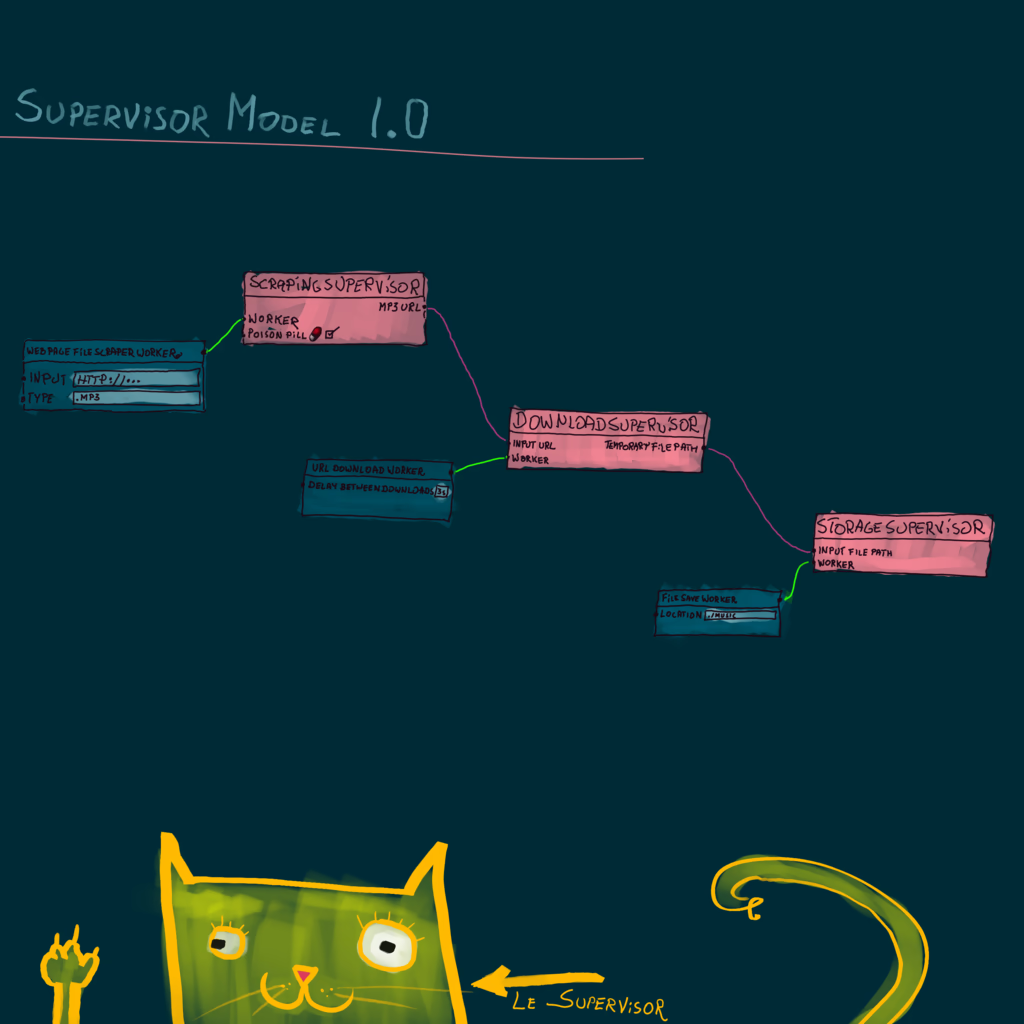
For example, you wake up in the morning, deciding that you need new workout music, euro-dance 1994.
You open up your program, and drop three supervisors on the canvas.
You name the first Scraping Supervisor, the second Download Supervisor, and the third Storage Supervisor.
You rename the Output Port of Scraping Supervisor to “mp3 URL”, and the output port of Download Supervisor to “temporary file path”
Now you drag a line connecting “mp3 URL” to, Download Supervisor input port.
And a line connecting Download Supervisor’s “temporary file path”, to Storage Supervisor input port.
You have just mapped out you entire program, it does not have any functionality yet, but you know where to add it.
In the worker port of Scraping Supervisor, you add a Web Page File Scraper Worker, common enough.
But can be easily made with cheerio and fetch, the Worker code should be easily customization.
But even more interestingly, the AI we have today, can totally program it for you.
I just asked it to do that, and I am just about ready to cry.
Screw rocket packs, we needed a programming AI.
I asked “Write me a webpage scraper that uses node fetch and cheerio, to scrape HTML for a particular file extension.”.
The AI decided to scrape for PDF files, and at a glance has done everything correctly.
If something got broken, asking it again would absolutely make it work.
Supervisors are not customizable, but workers do have a code editor where you can paste code it.
You will won’t have too much trouble expanding your own worker library, with just free AI, I used the free 4o mini variant.
So don’t worry about who is going to make the workers, and I will ship this library with a lot of them as it.
(Please note that I attached full AI response, to the end of the text version of this poem.)
To the worker port of Download Supervisor, you add a URL Download Worker, which will ship with the system.
And you add a File Save Worker configured to save files to your Music directory, to the worker port of Storage Supervisor.
And finally check a little red pill box on the Scraping Supervisor, that is the poison pill option.
Meaning that once all the mp3 files are collected, it will send a packet containing a poison pill.
First to its Web Page File Scraper Workers, then to Download Supervisor, and eat it it self.
The Download Supervisor will first pass the pill to its Workers, and then Storage, and again eat it.
And then the storage, will ends its workers, and it self, terminating your program run, with a cheerful beep.
I have nothing else to add, this is an incredible model based on an Actor Model, but one that relies on the beautiful and terse JavaScript EventEmitters.
And the entire reason why we are talking about this, that in the last three days, I made advancements in Visual Programming…
And needed an equally beautiful programming model, I have had my eye on Actors for a few years.
But it is really all about the supervisors, because if a download fails, or the server is down.
A worker will send an error to the supervisor, and quit after a couple of retries.
And the supervisor will wait a little bit, and launch a new worker.
This is a self healing system, that makes use of multiple cores by design, and has just about the simplest and most pleasant user interface in the world.
It does not mater if you are in kindergarten, or in a retirement home.
Please begin learning programming today, choose JavaScript.
JavaScript is beautiful, and comes with many video tutorials
Appendix – The AI Code
Certainly! Below is an example of a simple webpage scraper using Node.js with the node-fetch and cheerio libraries to scrape links for a specific file extension (e.g., .pdf).
Prerequisites
Make sure you have Node.js installed. You also need to install the required packages. Run the following command in your project directory:
npm install node-fetch cheerio
Scraper Code
Here's a basic example of the scraper:
const fetch = require('node-fetch');
const cheerio = require('cheerio');

const url = 'https://example.com'; // Replace with the target URL
const fileExtension = '.pdf'; // Replace with the desired file extension

async function scrapeLinks(url, extension) {
    try {
        // Fetch the HTML from the URL
        const response = await fetch(url);
        if (!response.ok) {
            throw new Error(`Failed to fetch the URL: ${response.statusText}`);
        }
        const html = await response.text();

        // Load the HTML into Cheerio
        const $ = cheerio.load(html);

        // Find all anchor tags and filter by the file extension
        const links = [];
        $('a').each((index, element) => {
            const href = $(element).attr('href');
            if (href && href.endsWith(extension)) {
                links.push(href);
            }
        });

        // Log the found links
        console.log(`Found ${links.length} links with the extension '${extension}':`);
        links.forEach(link => console.log(link));
    } catch (error) {
        console.error('Error:', error.message);
    }
}

// Run the scraper
scrapeLinks(url, fileExtension);
How It Works
- Fetch the HTML: The
fetchfunction retrieves the HTML content from the specified URL. - Load HTML with Cheerio: The HTML is then loaded into Cheerio, allowing you to use jQuery-like syntax to parse and manipulate it.
- Extract Links: The script looks for all
<a>tags and filters thehrefattributes for links that end with the specified file extension. - Output Links: Finally, it logs the found links to the console.
Running the Scraper
To run the scraper, simply execute the following command in your terminal:
node your-script-name.js
Make sure to replace your-script-name.js with the actual name of your JavaScript file. You can also change the URL and file extension in the script as needed.
Note
Be sure to respect the site's robots.txt file and terms of service when scraping, and consider adding delays between requests if you plan to scrape multiple pages.